

Archives: Downloads

  • Snap Buy for WooCommerce

    Snap Buy for WooCommerce

    Snap Buy plugin adds a Buy Now button to your WooCommerce store. When clicked, it adds the product to the cart, opens checkout in a modal overlay, and lets customers complete payment without leaving the page.

    Why You Need It?

    Standard WooCommerce checkout sends customers away from the product page, through the cart, then to a separate checkout URL. Each click is a chance to abandon. Snap Buy removes those steps.

    With Snap Buy, a single “Buy Now” click adds the product to cart and opens checkout in a modal overlay—right there on the same page. No navigation, no distractions. Customers stay focused and complete payment faster.

    How It Works

    You can insert a buy button to anywhere using Snap Buy Button block or widget in Gutenberg / Elementor. Set the product id and variant id, that’s it! The plugin can also automatically insert a buy now button to the shop page and the single product page.

    We also provide a product list block / Elementor widget that allow you to add a product grid to the page with the buy now button.

    Who it’s for

    • Store owners who want higher conversion and fewer abandoned checkouts
    • Sites running flash sales, limited offers, or impulse-driven products
      Anyone building landing pages or product grids with Elementor or Gutenberg

    What you get

    • One-click path from product to payment
    • Checkout in a modal (header, footer, sidebar hidden for a focused experience)
    • Product List grid with Add to Cart + Buy Now on every item
    • Flexible placement: shortcodes, blocks, Elementor widgets, or automatic on shop/single product pages

    Less friction. Fewer drop-offs. More sales.
  • Media Tree Pro

    Media Tree Pro

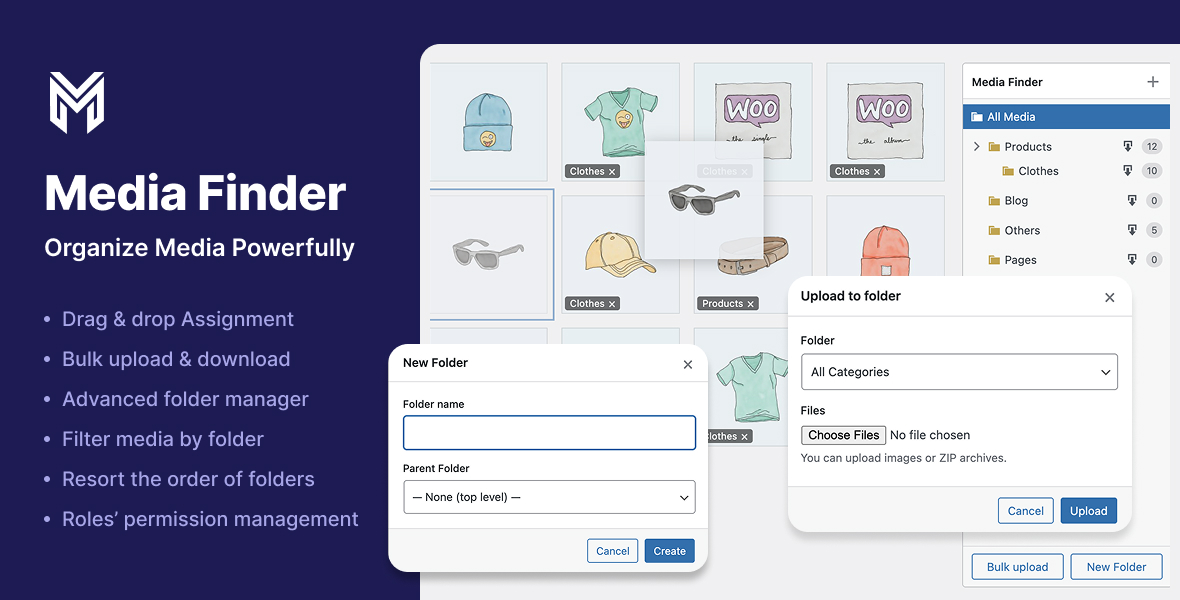
    Media Tree transforms the default WordPress media library into a powerful, folder‑based manager. Instead of endlessly scrolling through uploads, you get a clean, draggable folder tree (stored as a taxonomy) that lets you organize thousands of images, videos, and documents in seconds.Create nested folders, drag files between them, bulk-assign existing media, and even bulk-upload directly into a target folder (including ZIP archives). A lightweight, native UI blends seamlessly with the WordPress admin and works in both grid and list views.

    Folder tree in the media library

    Visual, hierarchical folders on the right side of the media library, backed by a custom taxonomy (media_finder_category).

    Drag & drop organization

    Drag single or multiple attachments onto folders in grid or list view to assign them instantly. Folder badges on thumbnails show current assignments.

    Context menu for folders

    Right-click any folder to create subfolders, rename, cut/paste (move), or delete it. Drag folders to reorder siblings and persist custom folder order.

    Bulk tools for real workflows

    Bulk upload files or ZIP archives directly into a chosen folder.

    Bulk assign selected items to a folder from the media modal toolbar.

    Download folders as ZIP

    Export an entire folder (including subfolders) as a ZIP file with one click.

    Per-feature role permissions

    Fine‑grained control over who can view folders, create/rename/delete them, move them, assign media, bulk upload, and download ZIPs. Perfect for multi-author or client sites.

    Custom Folder Color

    Assign a custom color to each folder so you can visually distinguish categories at a glance